
Halterwechsel – Occasion-Stromer
General information
Stromer schreibt zum Betrieb ihrer S-Pedelecs folgendes:
Stromer Speed Pedelecs offer motor assistance up to 45 km/h (28 mph) and are therefore legally light motorcycles in the L1e-B class as defined by Directive 2002/2004/EC
(USA: Class 3)Vehicles in this category must be registered and insured in most European countries.
Before driving your Stromer for the first time, be sure to find out about the applicable national regulations for this vehicle category from your registration authority.
See here too in the FAQ → ‚Laws and regulations for S-Pedelecs'
See also here in the FAQ → ‚Import/Export Stromer (Switzerland)‘
Kauf eines Occasion-Stromer – Checkliste
If you want to buy a Stromer as a used vehicle, it is advisable to check a few points beforehand. Here Can you find a checklist that you can use for this?.
Occasion-Stromer registrieren bei Halterwchsel
Omni C
With the Stromer OMNI app (Release (June 2021, from version 3.0.0) you can change the owner yourself. To do this, go to your profile in the Omni app (bottom right icon), scroll to „Add another Stromer“, and follow the pairing instructions.
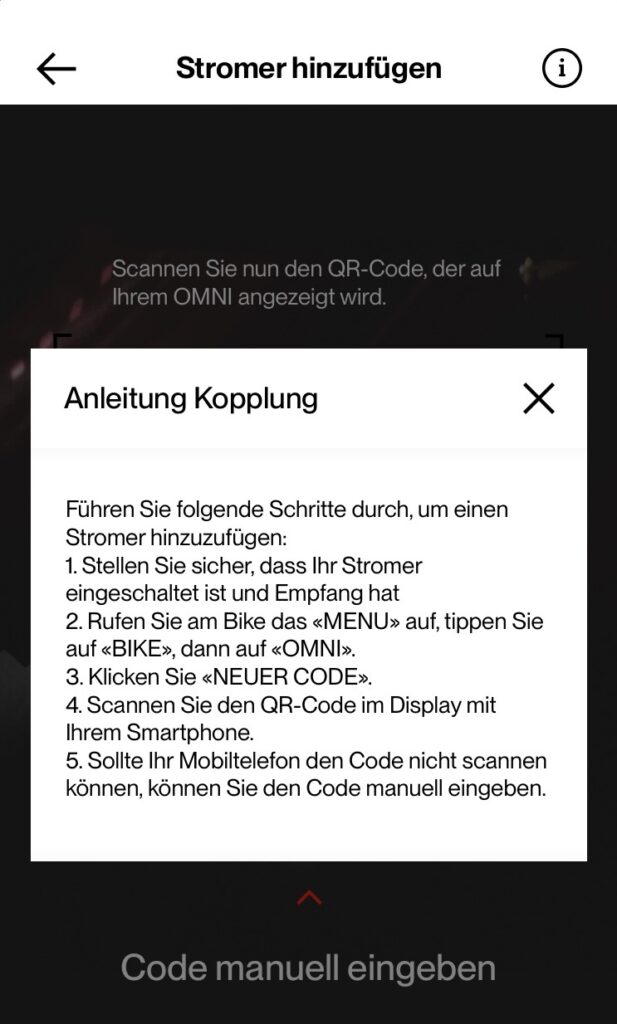
After that, starting with FW Release 4.3.3.2 (March 11, 2021), you have the option to add a Stromer via its QR code (in Omni under MENU → BIKE → OMNI → REGISTRATION → NEW CODE). How to Video.
The previous owner must remove the bike from their Omni app so it can be reassigned.
If a new QR code is requested to connect to a Stromer user account, it will be checked from FW 4.3.4.5 (10/06/2021) whether a user account is already linked to this Stromer. If a user account is already linked, an informational message will be displayed instead of a QR code.
Omni BT
Auch für Stromer mit dem OMNI BT (z. B. ST1 ab 2019) muss ein Stromer-Konto erstellt werden. Ein Stromer-Händler benötigt dafür:
- First and last name
- E-mail address of the electricity account
- Cell phone number
- VIN of the purchased/sold Stromer
Alternativ kannst du die Stromer OMNI App aus dem App Store (iOS) oder Play Store (Android) herunterladen und darüber ein neues Konto erstellen.
Neues Stromer-Kundenkonto mit der Stromer App erstellen
See Frequently Asked Questions ‚Registration – New Stromer Customer Account‘ or in the Stromer FAQ.
Leisurely rides with the Omni app
See Stromer FAQ
Change PIN
See Stromer FAQ
Forgot PIN
See Stromer FAQ
PIN falsch, wird nicht akzeptiert
See PIN: vergessen / falsch / ändern
Problems
Stromer cannot be removed from the Omni App or the QR code cannot be generated:
- Turn off the Wi-Fi and connect the smartphone only via 4G/5G
- Switch off the Stromer with a hard reset (press the on/off button on the down tube for 15 seconds)
- Reinstall the Omni app
- Contact your dealer