
Carry out the following steps (legacy or classic version of smart lock)
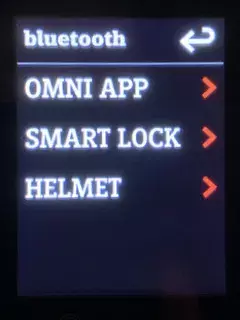
- Remove the entry for your mobile (name) or other entries (e.g. MAC address) in OMNI under Menu > Bluetooth> Devices.
- Remove all unknown or an existing Stromer entry in the Bluetooth settings on your mobile.
- Restart the Stromer and start a new pairing attempt by searching in OMNI. The name of your mobile should now be listed under Devices. Select this. A message will appear on your mobile. Confirm the request to pair the Stromer. The name of your Stromer will now appear in the Bluetooth settings of your mobile.
- Set the desired sensitivity (distance) with +/- under smart lock.
- If the pairing still does not work, you can still try to reinstall the Omni app on the smartphone and then set up the pairing.
Update: SUI FW Version 4.4.3.4 (07-02-2024)
See also FAQ - ,Riding Display – was ist das?‘
See auch PROBLEME – Smartlock – ,Stromer BT nicht verbunden‘
Update: SUI FW Version 4.5.0.3 (05-03-2025)
Stromer writes in the release notes:
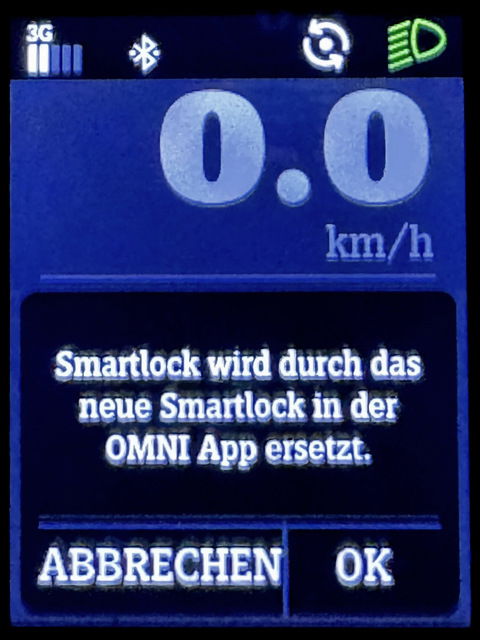
Das Legacy SmartLock (Sperren und Entsperren per Standard-Bluetooth) wird durch die neue BLE-Variante in Verbindung mit der Stromer OMNI APP ersetzt. Nutzer, die aktuell noch die ältere „Classic“ Version verwenden, erhalten einen entsprechenden Hinweis**. Die Stromer OMNI App muss im Omni über MENÜ > BLUETOOTH > OMNI APP neu verbunden werden.
SmartLock via Bluetooth BLE only works if the Stromer OMNI app is at least running in the background. The function is not active when the app is completely closed.
Installation instructions / FAQ / Troubleshooting
See '2024smartlock-and-riding-display-faq-german or english.pdf' (EN / EN)
Mein Stromer St 2 koppelt sich nicht mehr über Bluetooth mit meinem Iphone!???
Grüße aus Celle
Jens Kerschbaum
Hallo Jens
Die Seite ist eine private Homepage und es bestehen keine Verbidungen zur myStromer AG. Support können wir hier keinen anbieten.
Die drei Balken die du im Omni siehst haben nichts mit Bluetooth zu tun. Sie zeigen die Signalstärke des Mobilfunksignals.
Grundsätzlich wird bei einer BT-Verbindung diese im iPhone nicht oder als „nicht verbunden“ angezeigt.
Siehe auch PROBLEME – Smartlock – ‚Stromer BT nicht verbunden'
Das unterscheidet sich wiederum von der Funktionsweise, wenn das Riding Display verwendet wird.
Gibt es Probleme mit der BT-Verbidnung kannst du die angegebenen Schritte hier im Artikel durchgehen. Ein Videotutorial findest du ganz unten im Artikel verlinkt.
Greetings from Stromer
Der Admin
Mein Stromer St2 wird auf meinem Iphone in den Bluetooth Einstellungen nicht mehr angezeigt. Im Display vom Stromer sind drei Balken.
Das Iphone und die Telefonnummer sind neu, haben aber meines erachtens nichts mit Bluetooth zutun.
Bitte um eine Lösung, da das Bike noch super funktioniert.
Grüße aus Celle
Jens Kerschbaum