
Firmware is not displayed
Stromer distributes firmware updates for the electronic components (OMNI-C, controller, batteries and power supplies, ABS) via OTA (Over the Air). The different FW versions and a brief description are available on the myStromer AG service page listed.
Die Updates werden in Wellen verteilt. Bis ein neues, auf der Webseite gelistetes, Update auf dem eigenen Stromer ankommt kann es bis zu zwei Monate dauern.
Firmware download very slow
Bei älteren Stromern mit Omni C und 2G/3G Konnektivität kann es dauern bis ein Download einer neuen Firmware abgeschlossen ist. Dies liegt u.a. an der Grösse eines Updates aber auch am Umstand, dass in einzelnen Ländern das 3G network switched off and only the much slower 2G connection is available.
| 2G (GSM) | 9.6 kbit/s |
| 3G (UMTS) | 384 kbit/s |
| 4G (LTE Advanced (LTE-A from CAT 6) | 300 kbit/s |
| 5G (based on LTE, network slicing) | 10 GBit/s |
With a good 3G or 4G connection, downloading even a large update takes a few minutes at most. With 2G it can take 15-30 minutes. An interruption of the connection is not a problem, OTA continues the download where it left off.
The download progress can be tracked in the Omni via MENU > SYSTEM > ABOUT... or by tapping on the download icon. See also 'Firmware updates'.
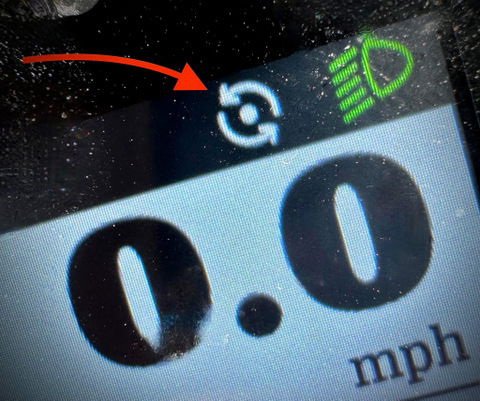
Firmware hangs
Backend problemIt can happen that the download causes problems. This occurred, for example, during the outage in the Stromer infrastructure backend in April 2025. The automatic distribution mechanism failed, and updates remained stuck in the queue for weeks. A faulty download cannot be ruled out either. The consequence is installation errors and, if applicable, malfunctions in the components: Omni, Battery, Charger, Controller, or the blubrake ABS. The solution is to manually install the FW – see the info box above.
BugfixWith SUI FW 4.3.4.1 from 06/11/2021, the bootloader of the OMNI Interface B & C was updated to version 2019.01 (previously 2016.11). This fixed an error that caused the OMNI to no longer start after an update.
Firmware - Installation
See OMNI / DISPLAY V1, V1.1 - 'Firmware updates'
Firmware - incorrect configuration (only 32 km/h possible)
See PROBLEM - General -‚Top speed (only) 32+ km/h!?
Firmware – Probleme mit der Verbindung des Omni B mit der Omni BT App
See PROBLEME – Omni – BT App – ,Probleme mit der Verbindung‘