stromer-tech.info
  • Home
  • FAQ | A - Z
    • FAQ | A - M
    • FAQ | N - Z
  • Links & Videos
    • Stromer instructions / How to videos
    • Tips
    • Velotechnik | Bike-Latin
    • Care (means) | Tools
    • Online tools
  • Imprint
    • Privacy policy
  1. Home
  2. OMNI / DISPLAY V1, V1.1
  3. Omni flow chart
Searching...

Omni flow chart

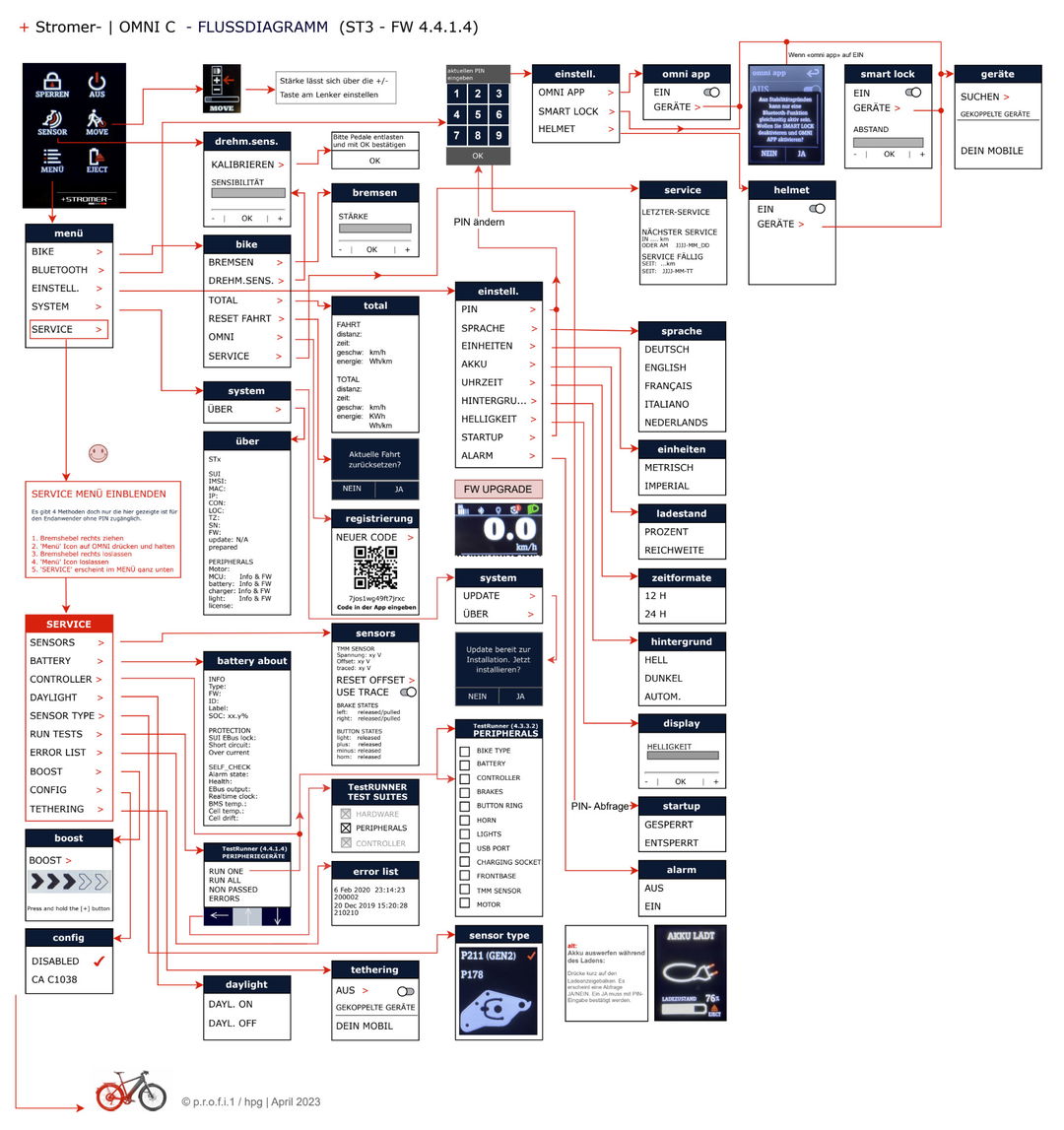
Stromer does not offer a flow chart of its OMNI display. I have visualized this and present it here available.

Updated on June 9, 2026
Tagged: Operating sequenceDiagramScheme
Was this article helpful?
Yes No

Related Articles

  • Omni - Red and black bars, what do they mean?
  • Omni BT App – Probleme mit der Bluetooth-Verbindung
  • Omni app crashes - reinstallation
  • Sensors / speed levels / engine tuning
  • Connectivity - technology/provider/costs?
  • Test Runner (Selftesting Components)

Leave a Comment Cancel

  • Omni - Red and black bars, what do they mean?
  • Omni BT App – Probleme mit der Bluetooth-Verbindung
  • Omni app crashes - reinstallation
  • Sensors / speed levels / engine tuning
  • Connectivity - technology/provider/costs?

Topics

  • ACCU
  • BRAKES
  • ELECTRICS & ELECTRONICS
    • Connection/Pin Assignment
    • Fairs
    • Electrical & electronic problems
    • Testing / Checking
  • FAQ
  • ERROR AND WARNING MESSAGES
  • MOTOR
  • OMNI / DISPLAY V1, V1.1
  • PIMP mySTROMER
  • PROBLEMS
    • Rechargeable battery, battery
    • General
    • Brakes
    • Miscellaneous
    • Electrics & electronics
    • Error and warning messages
    • Chain (sprocket) / pulleys and belts
    • Motor
    • Omni
    • Tires / Rims
    • Circuit
    • Smartlock
  • RANGE
  • CIRCUIT
    • Terms
    • Chain vs belt
    • Pinion
    • Problems - Circuit
    • Smurf Speed Drive
    • Shimano (e.g. Di2)
    • Sturmey Archer
    • Wear and tear
  • TMM-SENSOR
© 2024 | Copyright by stromer-tech.info
  • EN
  • NL_NL
  • NL
EN
DE NL_NL NL