-
Used Stromer Registration
See FAQ - ‚Owner Change/Register Used Stromer | Forgot/Missing PIN | New Stromer Customer Account | Problems‘
-
Omni App - Engine tuning/speed levels
See OMNI / DISPLAY V1, V1.1 - 'Sensors / speed levels / engine tuning'
-
Omni App – neuen oder gebrauchten Stromer (nach Besitzerwechsel) mit dem Omni koppeln
Stromer OMNI C
Carry out the following steps when you first take your Stromer to the OMNI App would like to add:
- Make sure that your Stromer bike has reception.
- Open the OMNI app on your smartphone and click on "Add Stromer".
- Call up the menu on the bike display, select "BIKE" and then "OMNI".
- Click on "NEW CODE".
- Now use the OMNI app to scan the QR code shown on the bike display.
If the QR code is not recognized by your smartphone, you can enter the displayed numerical code manually instead.
If you already have a Stromer in your OMNI app and want to add another bike, proceed as follows:
- Call up the profile page in the Stromer OMNI app.
- Scroll down to "Add another Stromer".
- Now follow the same process as above.
How to video by Stromer (EN)
Stromer OMNI BT
If you have purchased a Stromer with the OMNI BT app, your dealer will need the e-mail address of your Stromer account, the VIN number of the bike and your personal details.
If you do not yet have a Stromer account, you can register with a Stromer dealer create an account or download the Stromer OMNI app and create an account yourself.
How to video by Stromer (EN)
-
Omni App - Pictogram not available or incorrect
Sometimes the pictogram of the Stromer model is missing on the start page of the OMNI app.
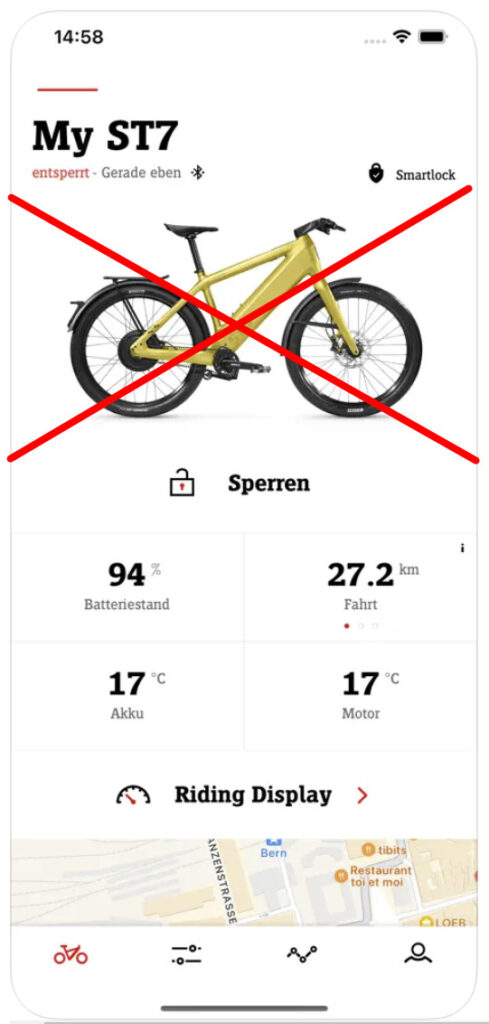
You can try the following:
- 1. log out of the OMNI app and log in again
- 2. new OMNI app from Google Play Store or Apple Store install
- 3. contact your dealer
-
Omni App - Shows the wrong location!
See PROBLEMS - Omni - 'Omni app shows the wrong location!
-
Omni - 2G/3G/4G? - What happens when the network is switched off?
See OMNI - '2G/3G switch-off / 4G upgrade...'
-
Omni - Expansion/Installation & Removal Tool (SUI Nut Tool)
See OMNI / DISPLAY V1, V1.1 - ‚Installation / Removal‘
-
Omni - DIY exchange, is that possible?
Electronic components can be exchanged 1:1 within the respective model without the involvement of the dealer or myStromer AG.
The OMNI is an exception. It is registered in the Stromer database with a unique VIN (chassis number). If the Omni is replaced, it must be re-registered in the portal. This can only be done by a Stromer dealer or myStromer AG.
-
See OMNI / DISPLAY V1, V1.1 - 'Omni - Flowchart'
-
Omni - Red and black bars, what do they mean?
See OMNI / DISPLAY V1, V1.1 - 'Red and black bars, what do they mean?
-
Omni - Conversion from b/w to OMNI C LTE-M (4G) - is that possible?
Yes, but you also need an adapter cable set (item no. 401613), approx. 49 €
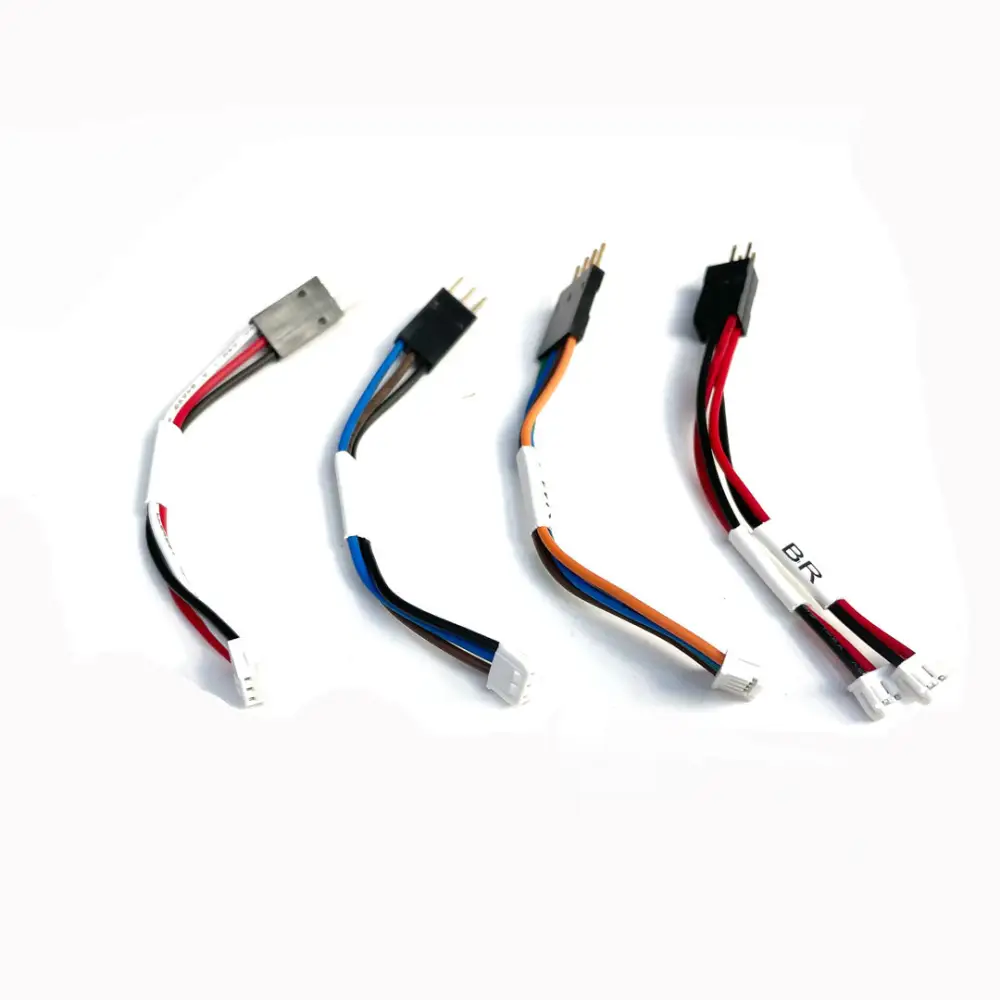
Omni Monochrome > Color - Adapter kit, Art. No. 401613, approx. 49 € -
Omni - Symbols - What do they mean?
See OMNI / DISPLAY V1, V1.1 - 'Omni symbols'
-
Maintenance - chain and belt - what does Stromer say?
See PIMP mySTROMER Care / cleaning of the Stromer
-
Care - lubrication and ointments help everywhere - really?
See PIMP mySTROMER - 'Care / cleaning of the Stromer'
-
PIN: ändern / vergessen / falsch
General
Die Kommunikationswege beim OMNI C (Color) und OMNI B (Bluetooth) unterscheiden sich fundamental. Die Omni C korrespondieren mit dem Stromer Backend über eine Mobilfunkverbindung (2G/3G/4G). Beim OMNI BT passiert das über die installierte und gekoppelte OMNI BT App ausschliesslich per Bluetooth. Daraus ergeben sich verschiedene Lösungsansätze bei den Themen:
- Change PIN
- PIN vergessen, verloren
- PIN Eingabe falsch, wird nicht akzeptiert
Bedingungen:
- Ein vorhandenes Stromerkonto bei dem man sich erfolgreich anmelden kann
- Eine gute Mobilefunkverbindung beim Omni C
- Eine funktionierende Bluetoothverbindung beim Omni B
See – FAQ – ,Registrierung – neues Stromer-Kundenkonto‘
Change PIN
Omni C (und Omni App)
Modelle: ST1, ST1 X, ST2, ST2 S, ST3, ST5, ST7per OMNI: Drücke so lange auf das Symbol «SPERREN», bis du aufgefordert wirst deinen aktuellen PIN einzugeben. Anschliessend kannst du einen neuen PIN festlegen.
per OMNI App: Gehe zum Menü «Konfiguration» (2-tes Symbol unten v.l.) > «PIN ändern». Nach Eingabe des neuen PIN’s – und Bestätigung desselben – wird dieser automatisch an den Stromer, sowie per SMS an deine bei Stromer registrierte Mobiltelefonnummer, gesendet.
See auch Stromer FAQ oder das „How to“ – Video
Omni B (und Omni BT App)
Modelle: Alle ST1-Modelle ab 2019 kommunizieren über die OMNI BT-App und Bluetooth (Source).per OMNI: dito Omni C, oben
per OMNI BT App: Gehe zum Menü «Konfiguration» (2-tes Symbol unten v.l.) > «PIN ändern». Nach Eingabe des neuen PIN’s und Bestätigung desselben wird dieser über Bluetooth an den Stromer gesendet.
PIN vergessen, verloren, falsch (wird nicht akzeptiert), OMNI BT App gelöscht
Omni C (und Omni App)
per OMNI: keine Option (Lösung siehe OMNI App)
per OMNI App: Gehe zum Menü «Konfiguration» (2-tes Symbol unten v.l.) > «PIN ändern». Nach Eingabe des neuen PIN’s – und Bestätigung desselben – wird dieser automatisch an den Stromer, sowie per SMS an deine bei Stromer registrierte Mobiltelefonnummer, gesendet.
See auch Stromer FAQ
OMNI B (und Omni BT App)
per OMNI: keine Option
per OMNI BT App:
Sollte der PIN-Code bei einem Stromer mit OMNI B vergessen-/verloren/ falsch sein, oder hat man die Omni BT App gelöscht, gibt es aufgrund der Verbindungsarchitektur (Bluetooth) selber keine Möglichkeit den PIN-Code neu zu definieren.With the FW SUI 3.4.2.4 (07.01.2022) wurde deshalb neu das «PUK Feature» hinzugefügt.
Nach Vorweisung eines Fahrzeugausweises oder Kaufbelegs und/oder der VIN-Nummer kann der PIN-Code durch einen Stromerhändler über das Stromer Serviceportal zurückgesetzt werden. Dazu muss der Stromer physisch in die Werkstatt, damit eine Kabelverbindung (USB-Port) mit dem Omni hergestellt werden kann.
See auch OMNI / DISPLAY V1, V1.1 → ,Omni BT App – Probleme mit der Verbindung‘
See auch OMNI / DISPLAY V1, V1.1 → ,Omni BT App – Verwendung / How to use‘
See FAQ ,Halterwechsel – Occasion-Stromer‘ -
QR code sticker - What's it all about?
See TMM SENSOR - 'The QR code sticker - what's it all about?
-
Wheel bearing?
See here in the FAQ: 'Rims / hubs / wheel bearings - Which brands does Stromer use?
-
Frame and handlebar geometry - Terms
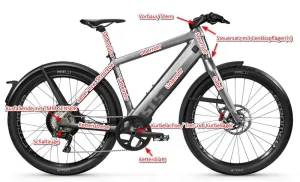
The frame of a bicycle / pedelec, S-pedelec, MTB... consists of many individual parts. If you talk about reach, backsweep, stem or fork travel, this is the normal naming in technical literature, but in everyday life it usually means little to the layman. In the here I have summarized and illustrated the most important terms and designations.
-
Registration – New Stromer Customer Account
A new electricity account can your Stromer dealer create. Alternatively, you can download the Stromer OMNI app and create a new account through it. See also the video from Stromer: "How To: Add a Stromer to the new OMNI app" (EN)
Nachdem das Konto erstellt ist, kann man einen neuen oder einen Occasions-Stromer dem Profil hinzufügen. See Frequently Asked Questions „Halterwechsel – Occasion-Stromer“. Der erste Sperrcode (PIN) wird zufällig generiert und bei der Aktivierung des Stromers per SMS an die registrierte Mobilnummer und per E-Mail an die registrierte E-Mail-Adresse zugestellt.
Beim Omni BT wird kein Aktivierungslink versendet. Man muss den PIN über die Omni-BT-App erstmalig festlegen.
-
Registration - (Used) Stromer with the Omni App (Omni BT App)
See FAQ – ‚Change of ownership / Register used Stromer / Remove Stromer from app / Problems‘
-
Reifen – Erfahrungen / Empfehlungen
Eine Auswertung der Erfahrungen, Kommentare und Empfehlungen zu 27.5-Zoll-S-Pedelec-Reifen für Stromer-Bikes (z. B. ST2, ST3, ST5, ST7) ergab folgendes Ergebnis. Die Daten basieren auf den Diskussionsforen und Facebook-Gruppen (stromerforum.ch, speedpedelecreview.com, Electric Bike Review / EBR, PedelecForum, Facebook: Stromer Owners/Schweiz/Belgien/Germany) und wurden mit Hilfe der KI Gemini ermittelt.
Meta-Synthese & Auswertung der Community-Diskussionen
In allen genannten Quellen lässt sich ein klares Bild zeichnen:
- Das Hauptproblem der Erstausrüstung: Die werkseitig verbauten Pirelli-Reifen erhalten von vielen Vielfahrern (insbesondere in den niederländischen und belgischen Foren, wo viel bei Ganzjahresregen gefahren wird) heftige Kritik bezüglich Nassgrip and Seitenwand-Rissbildung.
- Die Wechselgründe: Meist wird nach Stürzen oder Rutschern bei Regen/Kälte auf deutsche Herstellermarken (Continental / Schwalbe) gewechselt.
- Breiten-Problematik bei Stromer: Stromer verbaut ab Werk meist breite 57-584 (27.5 × 2.25″) oder 60-584 (27.5 × 2.40″) Reifen. Dritte Marken bauen oft etwas schmaler, weshalb die Wahl der exakten Dimension (ECE-R75-Zulassung) in Gruppen wie Stromer Schweiz intensiv diskutiert wird.
Statistisches Bewertungs-Ranking (5 Sterne bis 1 Stern)
⭐⭐⭐⭐⭐ (5/5 Sterne) – Die unangefochtenen Community-Favoriten
- Continental Contact Urban / Pure Contact (in 55-584 bis 60-584 / 27.5″)
- Community-Tenor (stromerforum.ch, PedelecForum, Stromer Schweiz): Gilt aktuell als die absolut beste Allround-Lösung. Viele Nutzer berichten, dass das Rad nach dem Wechsel von Pirelli auf Continental bei Regen wie „auf Schienen“ fährt.
- Positiv (+): Hervorragender Grip auf nassem und kaltem Asphalt, extrem hoher Pannenschutz, agiles Einlenkverhalten.
- Negativ (-): Fällt optisch einen Tick schmaler aus als der originale Pirelli.
- Pirelli Angel WT Urban (Winter)
- Community-Tenor (speedpedelecreview.com, Stromer Belgie): Der unangefochtene Ganzjahres-Sicherheitsreifen für Pendler in Nord- und Westeuropa.
- Positiv (+): Extreme Haftung bei Schnee, Nässe, Laub und Temperaturen unter 7°C; weiche Gummimischung gibt gute Eigendämpfung.
- Negativ (-): Höherer Rollwiderstand im Sommer, leise Abrollgeräusche bei Hitze.
⭐⭐⭐⭐☆ (4/5 Sterne) – Sehr gute Alternativen mit spezifischen Stärken
- Schwalbe Marathon Efficiency / Super Moto-X / Johnny Watts (27.5″)
- Community-Tenor (PedelecForum, ElectricBike Forum, Stromer Germany): Beliebte Touring- und Pendler-Reifen. Der Johnny Watts wird oft von Stromer-Fahrern genutzt, die auch unbefestigte Wald- oder Feldwege einbauen.
- Positiv (+): Marathon Efficiency liefert exzellenten Rollwiderstand (Akkusparend). Super Moto-X bietet viel Komfort durch hohes Luftvolumen.
- Negativ (-): Johnny Watts ist ab 40 km/h spürbar laut auf Asphalt. Bei Nässe gute, aber nicht ganz die überragende Haftung wie der Continental Contact Urban.
⭐⭐⭐☆☆ (3/5 Sterne) – Licht und Schatten (Serienbereifung)
- Pirelli Cycl-e ST / Angel GT Urban (Stromer Custom Spec)
- Community-Tenor (EBR, stromerforum.ch, FB Stromer Owners): Die Lager sind gespalten. Schönwetterfahrer lieben den Reifen, Ganzjahrespendler tauschen ihn häufig aus.
- Positiv (+): Hervorragender Geradeauslauf bei 45 km/h, extrem leise, sehr sportlicher Look auf den breiten Stromer-Felgen, extrem hohe Laufleistung auf trockenem Asphalt (oft >10.000 km).
- Negativ (-): Grip-Abriss bei Regen: In Foren wird häufig über Rutschgefahr in Kreisverkehren und Kurven bei Nässe berichtet. Viele Berichte im Stromerforum.ch über feine Risse an den Seitenwänden nach 1–2 Jahren.
⭐⭐☆☆☆ (2/5 Sterne) – Eher mäßiges Feedback
- Vee Tire Co. (z. B. Gridlock / Custom Stromer TA754)
- Community-Tenor (FB Problemen & Storingen, speedpedelecreview.com): Vereinzelt als Erstausrüstung verbaut, wird in der Community als „hölzern“ wahrgenommen.
- Positiv (+): Günster Ersatz, akzeptabel bei Trockenheit.
- Negativ (-): Härte der Gummimischung führt zu schlechter Rückmeldung, pannenanfälliger im Vergleich zu Schwalbe/Continental.
⭐☆☆☆☆ (1/5 Stern) – Deutliche Warnungen aus den Foren
- Schwalbe Big Ben / Kenda Erstausrüstungen (auf älteren 27.5″-Prototypen/Umbauten)
- Community-Tenor (PedelecForum, Endless Sphere): Werden von S-Pedelec-Fahrern einhellig als ungeeignet für schwere 45 km/h E-Bikes eingestuft.
- Negativ (-): Starke Rutschgefahr auf Straßenbahnschienen und nassen Kanaldeckeln, schwacher Pannenschutz.
Zusammensetzung der Empfehlungen in den Communitys
[Continental Contact/Pure Contact] ████████████████████ (45% Empfehlungen)
[Pirelli Angel WT / Winter]        ████████████         (25% Empfehlungen)
[Schwalbe Moto-X / Efficiency]     ████████             (18% Empfehlungen)
[Pirelli Angel GT / Cycl-e]        ████                 ( 8% Empfehlungen)
[Sonstige (Vee Tire etc.)]         ██                   ( 4% Empfehlungen)
Key Takeaway für Stromer-Fahrer
Wer das ganze Jahr pendelt (besonders bei Schweizer oder nordeuropäischem Regenwetter), wechselt laut Forenkonsens meist sofort auf den Continental Contact Urban (Sommer/Ganzjahr) oder den Pirelli Angel WT Urban (Winter). Der Werks-Pirelli Angel GT / Cycl-e reicht Fahrern, die primär bei trockenem Wetter unterwegs sind, vollkommen aus.
-
Tires - Size designations / Current tires
Wheel tires do not have a uniform Size designation which makes a direct comparison difficult. Three designations are common:
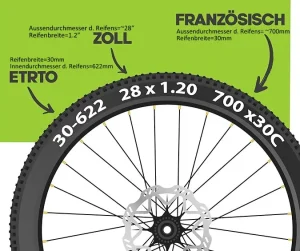
-
Reifen – Reifenwechsel/Schlauchreparatur
Models
Stromer verwendet Reifen von Pirelli und Vee Tire. Weiter gibt es im aktuellen Angebot Draht- bzw. Faltreifen.
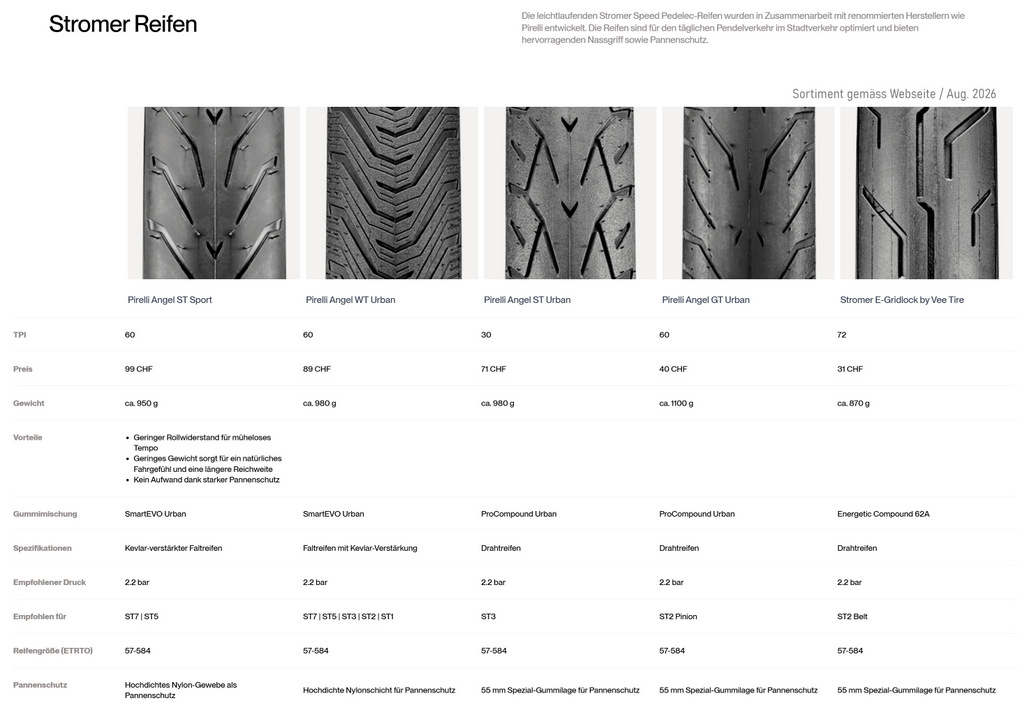
Stand: August 2026 See also here in the FAQ: Reifen – Erfahrungen / Empfehlungen
Reifenwechsel / Schlauchreparatur
Besonders die Drahtreifen sind beim Wechsel sehr schwer von der Felge zu bekommen. Geht man falsch vor oder verwendet ungeeignetes Werkzeug, riskiert man Beschädigungen am Felgenhorn oder der Reifenflanke.
Mein Stromer ST3 fährt mit den Pirelli Angel WT Urban. Er ist ein guter Kompromiss zwischen Sommer- und Winterreifen, kann das ganze Jahr gefahren werden und bietet auch einen guten Pannenschutz. Er hat ein etwas höheres Abrollgeräusch als die Angel-ST- oder -GT-Modelle.
Als Reifenheber verwende ich die PEDRO Reifenheber. Diese sind aus PVC und extrem stabil. Gummierte Metallreifenheber bergen die Gefahr einer Beschädigung der Felge.
Mein Vorgehen beim Wechsel:
- Luft ablassen
- Reifenflanke beidseitig und im ganzen Umfang mit den Daumen in die Mitte des Felgenbetts. Alternativ eine Tisch- oder – unterwegs – eine Bordsteinkante verwenden (etwas unterlegen, um die Felge nicht zu beschädigen) und mit dem einen Handballen den Reifen ruckartig in die Mitte des Felgenbetts drücken.
- Der schwierigste Teil:
- Reifenheber 1: Gegenüber dem Ventil unter die Reifenflanke hebeln und dann die Reifenflanke über das Felgenhorn hebeln.
- Reifenheber 2: Etwa 10–15 cm vom Heber 1 entfernt ebenfalls unter die Reifenflanke hebeln und die Reifenflanke über das Felgenhorn hebeln.
- Mit dem Heber 2 sollte es nun möglich sein, dem Felgenumfang entlang, die Reifenflanke weiter über das Felgenhorn zu schieben. Nach etwa 20–30 cm geht das leichter und die Reifenflanke ist schliesslich über den ganzen Reifenumfang frei.
- Nun kann z. B. der Schlauch gewechselt oder repariert werden.
- Will man den Reifen wechseln, muss die zweite Reifenflanke ebenfalls in die Felgenmitte gedrückt werden. Danach ist es meist einfach, mit beiden Daumen und den Handballen den Reifen über das gegenüberliegende Felgenhorn zu drücken und den Reifen komplett abzuziehen.
Wie ein Wechsel geht, zeigen z. B. diese zwei Videos:
> Tips & tricks for removing MTB & eMTB tires
> Changing MTB tires / hard casing - no problem / Tips & tricks -
Tire pressure - What is recommended?
The permissible pressure range is specified by the manufacturer on the tire sidewall. Here is the Pirelli Cycle-e ST of the Stromer ST3.
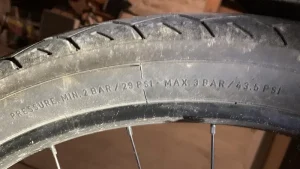
Stromer recommends the following tire pressure:
ST5 | ST3 | ST1 (27,5″- tires): 2.2 bar / 32 psi
ST2 S | ST2 | ST1 X | ST1 (26″ - tires): 3 bar / 43.5 psiThe air pressure should be checked and corrected at least once a month. Even the tightest bicycle inner tubes lose pressure continuously. A pressure loss of 1 bar per month can be considered normal. The pressure loss is significantly faster at high pressures and significantly slower at low pressures.
Legal situation:
For normal Pedelecs with pedal assistance up to 25 km/h the law does not prescribe any special tires.
For S-pedelecs with a maximum speed of 45 km/h, special approval of the tires is required. They must comply with the ECE-R75 approval valid in the EU. In Switzerland, type approval is required in accordance with Art. 18 let. a.
See also PIMP myStromer - ‚Rims 27.5″ - Alternatives‘
See also here in the FAQ - ‚Hose - which one is needed‘ -
Recuperation - what is it and what are its benefits?
See BREMSEN - 'Recuperation and recuperation'
-
Riding Display - What is it?
Mit der FW 4.4.3.4 vom 7. Feb. 2024 wurde gleichzeitig eine neue Version der Omni App (iOS = 4.0.0 (2833)) ausgeliefert, welche die neue Funktion ‚RIDING DISPLAY’ enthält.
It transfers the essential parts of the driving parameters from the Omni to the Mobile.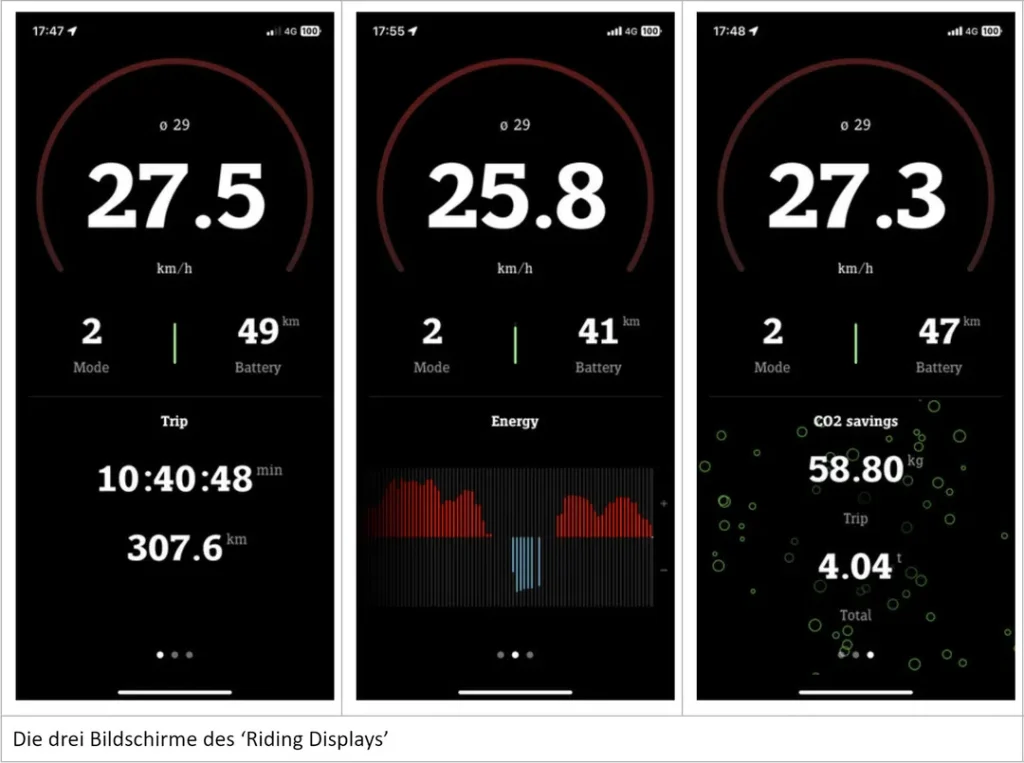
Furnishings
Siehe die Installationsanleitung / FAQ / Problemlösung der myStromer AG (EN / EN)
The setup is done in a few steps. This is briefly explained on the start page of the Omni under 'Further information'. To be able to use Smartlock and the Riding Display together, an existing connection with 'Smartlock' or 'Helmet' (in the Omni under Menu > Bluetooth) must be disconnected from the Bluetooth connection. You will be asked whether you want to activate the 'Omni App' option. Only when the classic way (Omni > Menu > Bluetooth > Smart Lock) has been deactivated, the smartphone can be re-paired with Bluetooth (Omni > Menu > Bluetooth > Omni App). If this is successful, the 'Riding Display' and 'Smartlock' can then be activated and used in the 'Omni App' under 'Configuration'.
Um das Riding Display anzuzeigen, muss man in der Omni App noch auf ‚Riding Display‘ tippen. Danach erscheint es in der Omni App.
Riding display and SmartLock
Mit Verwendung des Riding Display wird ebenfalls die Funktion ‚Smart Lock‘ in die Omni-App integriert und kann dort unter Konfiguration in drei Schritten bezüglich dee Empfindlichkeit eingestellt werden. Die klassische Version ‚Smart Lock‘ im Omni ist feiner abegstuft und hat 10 Stufen.
Bluetooth display
Beim klassischen Smart Lock wird im Omni, sowie der Omni-App das BT-Symbol angezeigt und im Smartphone unter Bluetooth der Stromer als ‚verbunden‘ angezeigt.
Experience (as of 1/2025)
Bei mir ging die Einrichtung (iPhone 15 Pro May) problemlos, die Verbindung mit Bluetooth ist allerdings instabil und das Riding Display in der Praxis so nicht brauchbar. Ich bin scheinbar not alone.
Experience (as at 3/2025)
Mit dem Firware Update 4.5.0.3 (05-03-2025) funktioniert bei mir Smart Lock über den Weg des Riding Display nicht mehr.
Note
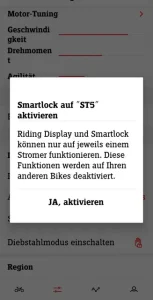
See also PROBLEME - SMART LOCK - 'What is Smart Lock'
-
Roseberger plug / socket - What, Where...
See ELEKTRIK & ELEKTRONIK - Cable diagrams | Pin assignment - ‚Rosenberger - Plug connection‘
-
Hose - Which one is needed?
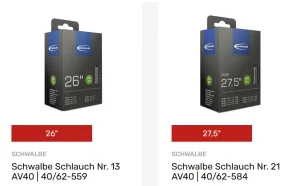
Alternatively, there is the Air Plus. This is thicker, contains more butyl rubber and ensures that you need to use the air pump less.
-
Key - replacement for CAMLOCK locks
On older Stromer models (ST1 | ST2 | ST2S), Stromer used a mechanical locking mechanism with a tubular key for the battery compartment.
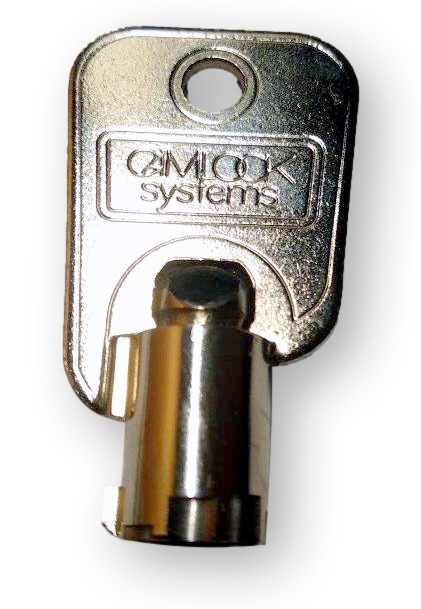
All keys are provided with a number. You can also find these in the Omni app under: Profile (bottom right) > Service booklet > Bike components > Keys.
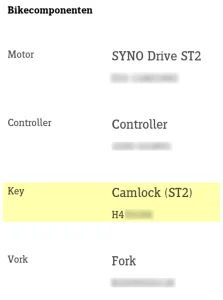
A replacement key can be obtained from the electricity dealer or from CAMLOCK be ordered. However, the matter is expensive: (Source). Here are the prices at Camlock (as of 2022):
- One key = 13,09€
- Minimum order value = 50€
- Shipping = 18.60€
-
Screw missing in the right dropout - really?
See PROBLEMS - MISCELLANEOUS - 'ST3 Pinion / ST5 - Dropout with missing bolt?'
-
Serial number of a component - Where can I find it?
A few serial numbers can be found in the Stromer OMNI app under Profile > Service Booklet > ‚Bike Components.
The VIN (Vehicle Identification Number) of Stromer S-Pedelecs is the official number with which a Stromer is registered in the CoC (Certificate of Conformity) in the vehicle documents and at Stromer. It is required for service work as well as administrative changes (change of owner...).
The VIN can be found:
- In the OMNI app under PROFILE (bottom right) > Service Book > VIN
- on a sticker in the battery compartment
- under the right-hand chain stay
-
Service recommendations from Stromer? / Service display in the Omni
With the firmware SUI FW 4.3.9.5 (10.08.2022), Stromer has introduced a service recommendation in the Omni:
- The service icon on the OMNI interface appears after the first 500 km
- A new service recommendation appears after 1 year or 3,000 km after the last service
- The service interval can be configured by the dealer
- In the Stromer OMNI App, the service can be reset, and the service reminder can be switched on and off (Omni App > Profile > Service: Reminder = inactive).
Service recommendation
The service work that should be done and when is listed in the owner's manual. However, the intended use of the electric vehicle is also a deciding factor.
- Some riders use the Stromer sparingly, others extensively.
- Some are fair-weather riders, others are all-weather riders.„
- Some maintain the power adapter, others little or not at all.
Whether you do it yourself or have it done is a personal decision and probably also depends on DIY skills. If you go to a dealer, it's certainly not cheap, but you're on the safe side, provided the dealer is reputable.
My practice
User Profile
ST3 (j. 2019). Rarely wet driving, no salt in winter, recuperation used.Service Indicator:
I have deactivated the service display and do all the maintenance work myself.Maintenance:
The chain and drive unit are regularly maintained. The wheel bearings and bottom bracket are not lubricated.Replaced parts on my ST3, year 2019:
See Here in the FAQ – ,‘Wear and tear and service life of components'Cleaning
I just clean the bike with a bucket of water and a bit of washing-up liquid, a sponge and a microfiber cloth. Then I apply Muc Off BikeProtect on. I also check visually:- Check the brake callipers for traces of oil and secure the brake pads
- The caster of the front wheel
- The bottom bracket for smooth running and side play of the left crank
- Check the cassette and freewheel for play
- You can also hear or notice when something is mechanically wrong. The drive becomes louder or jumps if it is dirty or worn. The steering creaks or hitches. If something is wrong with the brakes, you can hear and feel it ;-).
-
See OMNI - 'Show service menu'
-
Shadow RD+ – What is that?
See SHIFTING - Shimano > ‚Shadow RD+ – what is that?‘
-
Smartlock - What is it / Settings and troubleshooting
See PROBLEMS - 'Smartlock (formerly 'Seamless ride')'
-
Smart.Shift app from Pinion - Does it work with a Stromer?
The ST5 Pinion and ST7 models use the Pinion C1.9 and C1.12 gears with Smart.Shift. Pinion offers the app 'Pinion Smart.Shift' with which you can configure the gearshift.
Does this work with Stromer? The answer is no.
See also SCHALTUNG - PINION - 'Smart.Shift App'.
-
SoH (State of health) - What is it?
Extract from Wikipedia:
In the field of electric vehicles, the state of health (SoH) is a measure of the condition of a battery (cell/module) compared to its new condition. The SoH unit is a percentage [%] and refers to the new capacity (100 %) in accordance with the specifications.
Unlike the batteries in electric cars, the space in e-bikes is severely restricted, the weight is limited and thermal management of the battery is not possible. Furthermore, the aim is to achieve maximum riding distance with the greatest possible support. All in all, this means that the battery is usually operated to the limits of its operating parameters. Gentle treatment, in terms of an ideal operating temperature range, charging and discharging currents, a limited charging stroke DoD (Depth of Discharge) or a limited charging window are usually not possible.
Folge davon ist neben der chemisch bedingten kalendarischen Alterung eine recht zügige Alterung durch den zyklischen Alltagsbetrieb. Zum Thema SoH bei Stromer see auch folgende Kapitel:
See the following topics under the chapter ‚BATTERY‘:
- 'Aging - SoH loss'
- 'Self-discharge of a BQ983 battery'
- Akkugesundheit… „SoH“ ? (Wie erfahre ich den SoH?)
- 'Theory & terminology compendium for Li-ion batteries'
Wie die Alterung mit einem Zusatzakku (Extender) verzögert werden kann beschriebe ich in folgendem Kapitel. See Pimp my STROMER – ‚Battery Extender'
-
ST7 - Open battery compartment without power?
See PROBLEMS - BATTERY - 'Battery cannot be ejected because Stromer does not start?
-
Stromer does not start - What to do?
See PROBLEMS - General - ‚Stromer does not start - (battery cannot be removed)‘
-
Stromer sound - what is it?
Stromer introduced the 'Stromer sound' with the ST5 Pinion model (Limited Edition was available from Dec. 2023). What this is and what it sounds like can be seen in the video here can be viewed or heard.
-
Tageskilometer stoppt bei 6’553.5 km – Rücksetzung nötig – Wieso?
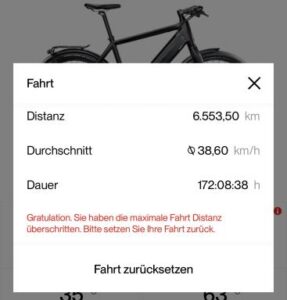
Der Grund dafür ist ein technisches Datenlimit (ein Überlauf der Speichervariable) in der Software des Stromer OMNI Displays.
Der Wert 6553.5 entsteht durch eine Begrenzung auf 16 Bit:
Der maximal darstellbare Wert einer 16-Bit-Zahl (unsigned integer) ist 2^{16} – 1 = 65535.
Da Stromer die Tageskilometer mit einer Nachkommastelle (in 100-Meter-Schritten) speichert, wird dieser Wert durch 10 geteilt.
Das ergibt exakt 6553,5 km.
Sobald dieser Zähler seinen maximalen Speicherplatz erreicht hat, kann das System keine weiteren Kilometer mehr aufaddieren und fordert Sie dazu auf, den Tageskilometerzähler (TRIP) manuell über das Display-Menü oder die OMNI App auf 0 zurückzusetzen.
Keine Sorge: Dies betrifft nur den Tageskilometerzähler. Der Gesamtkilometerstand (Gesamt-ODO) Ihres Stromers läuft normal weiter.
-
Test Runner (SIT) – What, where, how?
In the Omni Service menu there is a so-called. System Integration T(SIT). The test routine itself is called Test Runner, which is used to test the components built into the Stromer, such as the motor, controller, battery, brakes, sensor, etc. It can be accessed via the SERVICE MENU - RUN TESTS.
See also ELECTRICITY / ELECTRONICS – Diagnostics – 'SIT(Test Runner) - Test components'
See TECHNOLOGY – BATTERY – 'Battery SELF_CHECK - Recognize problems' -
Support causes problems
See TMM-SENSOR - 'Problems with support and solutions'
-
USB connection - What can it (not) do?
See PIMP mySTROMER - 'USB connection external - wireless charging'
-
Use Trace - What is it?
See TMM-SENSOR - Use Trace'
-
Wear and tear and service life of components
Factors
The mileage of wearing parts such as brake discs, brake pads, chains, belts and tires depends on various parameters:
- Driving style
- Route profile
- System weight
- Using recuperation (button ring) and setting the brake sensor
- Use of the bike as a "fair-weather" or "all-weather" bike
- Care
It is impossible to make a general statement as the parameters are too individual.
Own experiences
Experience with my ST3 (as of Feb. 2026, 42,186 km):
- Chain: KMC e11 EPT - approx. 10’000 - 11’000 km (oiled after approx. 500-1’000 km)
- Sprocket 11, ditto chain, 13 etc. as required
- Tires: Pirelli Cycle-e ST: changed:
- In front: after 28,353 km
- Rear: after 15,000 km (no flat tires so far)
- Brake pads: (hilly terrain, recuperation used, brake sensor 100%)
- Rear: SwissStop after 37,886 km, still good *
- Front: TopBrake since 28,699 km, still good *
- Brake disks: Original
- Front wheel bearing: 28,353 km
- Bottom bracket: 34’010 km
- Engine mounts: 38‘970 km
- Freewheel: Original
- BQ983 battery: 21,000 km until SoH 74% was reached
* Replaced at 4,300 or 13,487 km due to squeaking
See also:
See also PROBLEMS - chain (-blade) / pulleys and belts:
- ,Chain jumps, slips, crunches, is thrown off'
- 'Chainring / bottom bracket - wear and tear?
- 'Broken belt, has lost teeth'
See also SCHALTUNG - 'Comparison: costs / care / (life) maintenance' under life expectancy
See also here in the FAQ:
- 'Chain - measure wear'
- 'Number of chain links / brand?
- Care...'
-
VIN (Vehicle Identification Number) - Where can I find this?
The VIN (Vehicle Identification Number) of Stromer S-Pedelecs is the official number with which a Stromer is registered in the CoC (Certificate of Conformity = operating license) is registered in the vehicle documents and at Stromer. It is required for service work but also for administrative changes (change of owner...).
The VIN can be found:
- on a sticker in the battery compartment
- under the right-hand chain stay
- in the OMNI app under PROFILE (bottom right) - Service booklet > VIN
-
Wicket Cable - What is it?
Wicket, from English, means gate. At Stromer, these are cable distributors with Rosenberger connectors or, in older models, D-Sub 7-pin connectors, which are both installed directly at the lower end of the battery compartment. They connect the battery to the bicycle's electrical system and are thus essentially the gate from the battery to the bike.
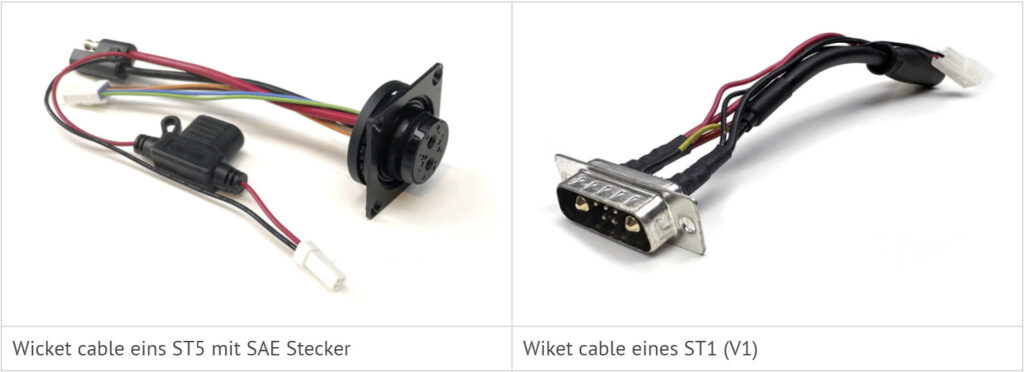
Where is it installed?
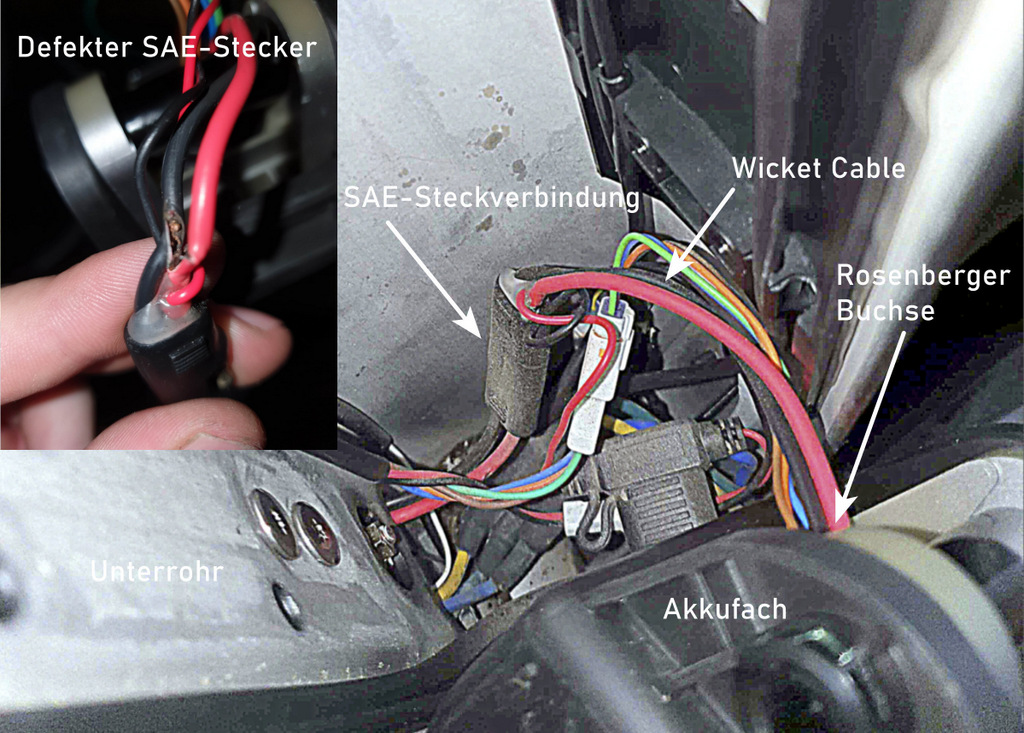
The Wicket cable can also be a source of faults. Thermal stress on older versions with the SAE connection can lead to deformation or short circuits.
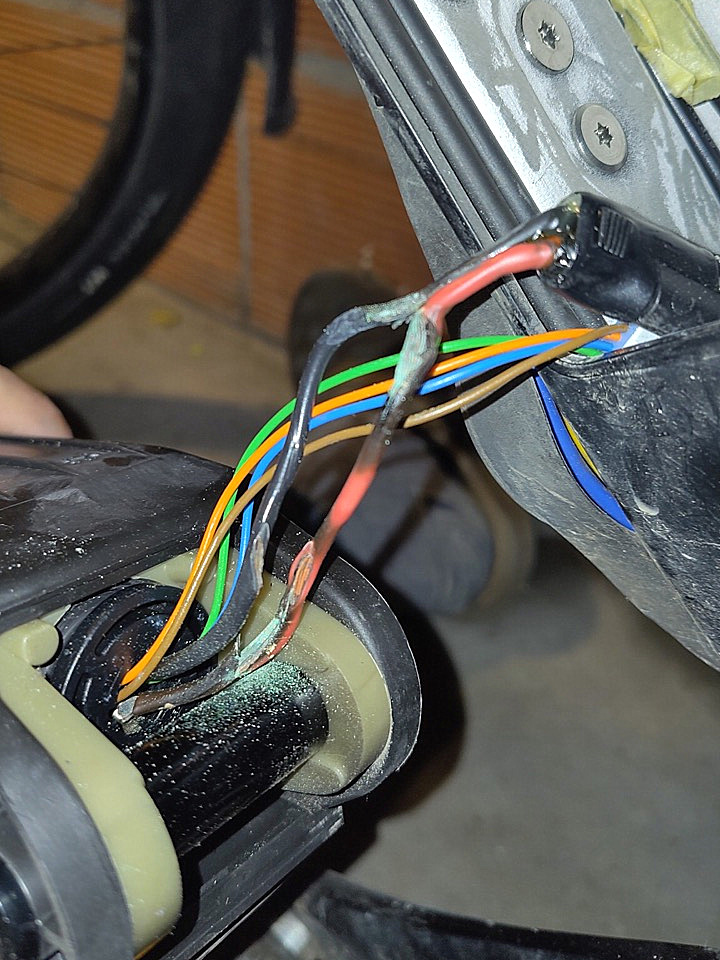
Wicket Cable with SAE connector on a 2018 ST3 Error E210003 or E21041A? > See ERROR AND WARNING MESSAGES
-
WREN USD Suspension Fork - Owner's Manual / Adjustment
See also:
- WREN USD suspension fork adjustment (ST3/ST5/ST5)
- WREN Suspension Fork - User Manual Stromer BikesEN / EN)

- Home
- FAQ | A - Z
- Stromer FAQ | N - Z